# OpenNest
A Windows desktop application for CNC nesting — imports DXF drawings, arranges parts on material plates, and exports layouts as DXF or G-code for cutting.
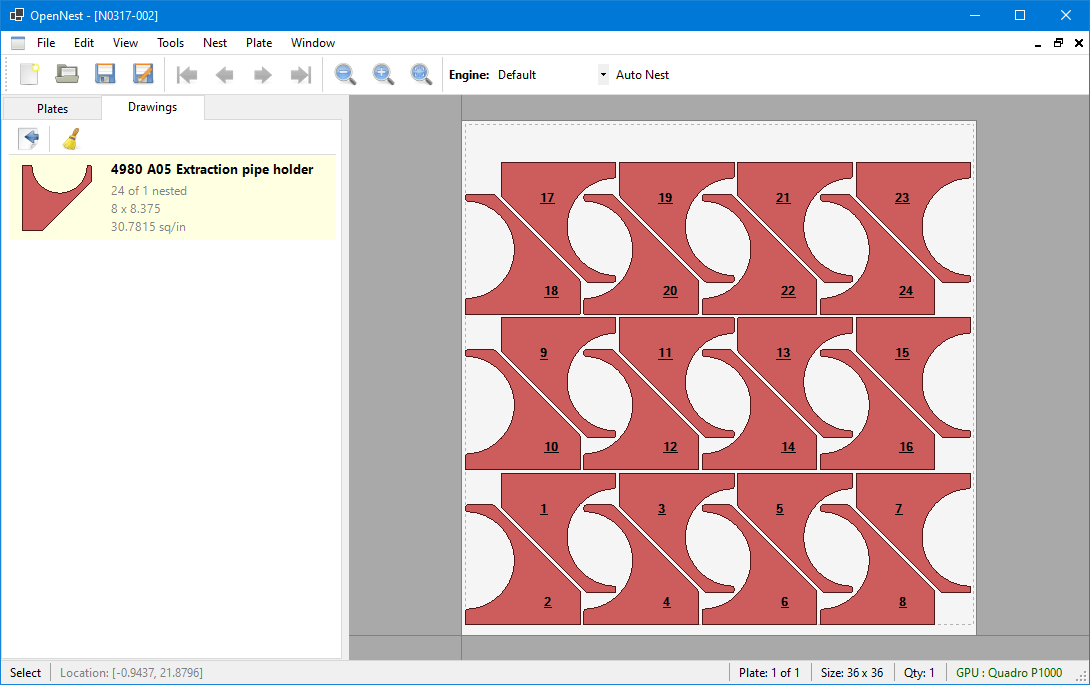
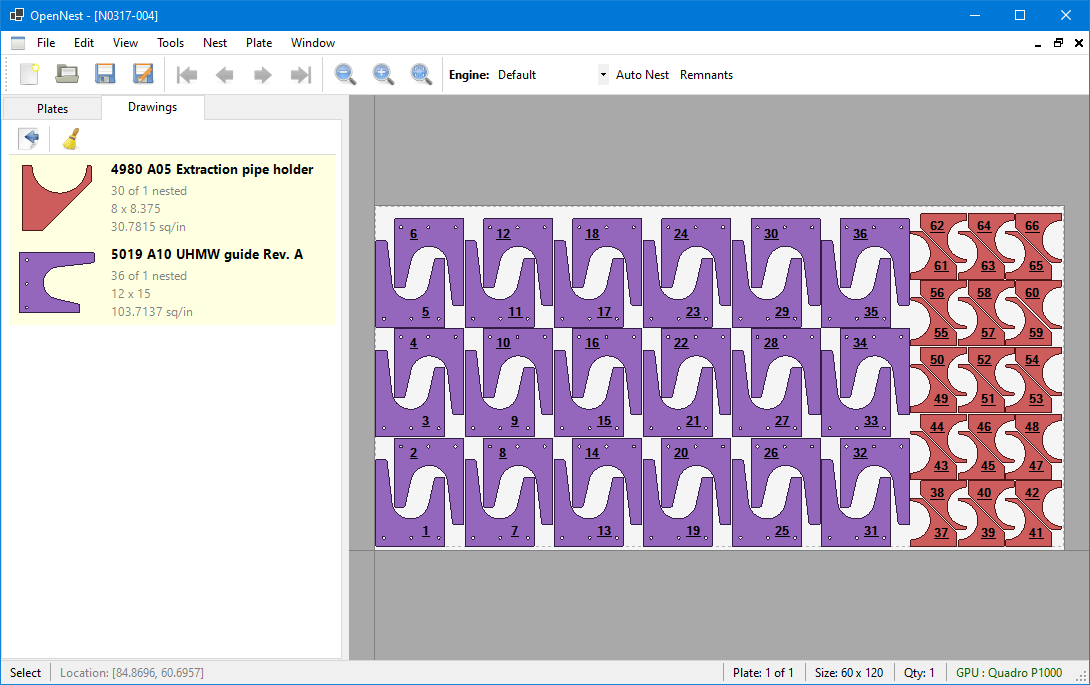
## Features
- **Import / export** — DXF & DWG parts (ACadSharp), Excel BOMs, bend-line detection, built-in parametric shapes; export DXF or post-processed G-code.
- **Nesting** — pluggable whole-job engines (Default, Strip, Vertical/Horizontal Remnant, StockLadder, plus DLL plugins), NFP-based interlocking pair evaluation, gravity compaction, rotation sweeps, multi-plate/multi-material jobs.
- **Plate operations** — sheet cut-offs, oversized-part splitting (straight, weld-gap tabs, spike-groove), interactive editing.
- **CNC output** — configurable lead-ins/outs and tabs, contour editing, user-defined G-code variables (`$name` → `#200+` machine variables), plugin post-processors (Cincinnati CL-707/800/900/940/CLX included).
## Requirements
- Windows 10+ for the desktop app; the console, API, and most test projects build on Linux/macOS too.
- [.NET 8 SDK](https://dotnet.microsoft.com/download/dotnet/8.0)
## Build, Test, Run
```bash
git clone https://git.thecozycat.net/aj/OpenNest.git
cd OpenNest
dotnet build OpenNest.sln # full solution (Windows)
dotnet test OpenNest.Engine.Tests/OpenNest.Engine.Tests.csproj # cross-platform engine tests
dotnet test OpenNest.Tests/OpenNest.Tests.csproj # core/engine/IO/API tests
dotnet run --project OpenNest/OpenNest.csproj # desktop app (Windows)
```
`OpenNest.WinForms.Tests` (desktop-assembly tests) runs on Windows only. Format changed files with `dotnet format OpenNest.sln --include `.
### Quick start
1. File > New Nest
2. Import DXFs via the CAD Converter (layer/color filtering, bend detection, G-code preview) or create built-in shapes
3. Define plate size, material, quadrant, spacing
4. Fill — the engine arranges parts
5. Optionally add cut-off lines, then save `.nest`, export DXF, or post-process to G-code
## Command-Line Interface
```bash
dotnet run --project OpenNest.Console -- part.dxf --size 60x120 # fill one plate
dotnet run --project OpenNest.Console -- part1.dxf part2.dxf --size 60x120 --autonest
dotnet run --project OpenNest.Console -- project.zip # re-fill a nest file
```
Key options: `--size WxL`, `--autonest` (whole-job nesting), `--engine ` (jobs engine or fill strategy), `--quantity`, `--spacing`, `--template `, `--output `, `--check-overlaps`, `--post `, `--no-save`. Run without arguments for the full list.
## Benchmarking Engines
`OpenNest.Benchmark` runs every registered `INestingEngine` against `.nest` files (or a JSON manifest of DXFs + quantities) and scores by salvage-credited sheet area, with a penalty per unplaced part.
```bash
dotnet run --project OpenNest.Benchmark -- ./benchmark-jobs \
--sheet-sizes 48x96,60x120,72x120 --engines Default,StockLadder --csv results.csv
```
Layouts are validated (bounds, spacing, quantity, rotation, stock match); invalid runs place nothing and pay the penalty. `--parallel` (default 3) speeds up scoring but inflates `Time(ms)` — use `--parallel 1` when comparing speed. Pass `--sheet-sizes` for an unbiased run; otherwise only each file's original sizes are offered. Custom engines drop in as DLLs implementing `INestingEngine` (public parameterless constructor) in an `Engines/` folder next to the benchmark. Community engines live in [OpenNest-Engines](https://git.thecozycat.net/aj/OpenNest-Engines).
## Project Structure
| Project | Purpose |
|---------|---------|
| **OpenNest** | WinForms desktop app |
| **OpenNest.Core** | Domain model, geometry, CNC primitives |
| **OpenNest.Engine** | Nesting algorithms and whole-job contracts |
| **OpenNest.IO** | DXF/DWG, `.nest`, G-code, BOM I/O; CAD import |
| **OpenNest.Console** | Headless batch nesting |
| **OpenNest.Api / .Data** | Programmatic pipeline; machine & cutting-parameter data |
| **OpenNest.Gpu** | GPU-accelerated pair evaluation (ILGPU) |
| **OpenNest.Benchmark** | Head-to-head engine comparison |
| **OpenNest.Mcp** | MCP server for AI tool integration |
| **OpenNest.Posts.Cincinnati** | Cincinnati laser post-processor plugin |
| **\*.Tests** | Cross-platform suites; WinForms tests are Windows-only |
## Nesting Engines
Jobs-only API: engines implement `INestingEngine.Solve(NestJob)`; only `NestJobRunner` commits demand and stock, and every candidate passes the placement validator (bounds, spacing, rotation policy, stock match) before it consumes anything.
| Engine | Description |
|--------|-------------|
| **Default** | Multi-phase: linear fill → pairs → rect best-fit → extents |
| **Strip** | Iterative shrink-fill for mixed-drawing layouts |
| **Vertical / Horizontal Remnant** | Optimizes a clean remnant drop on one edge |
| **StockLadder** | Whole-job, stock-constrained baseline with salvage-credit ranking |
## File Format
`.nest` files are ZIP archives: `nest.json` (metadata, plates, drawings, placements), `programs/program-N` (G-code per drawing), optional `entities/`, sub-programs, and cached best-fit data.
## Supported Formats
| Format | Import | Export |
|--------|--------|--------|
| DXF | Yes | Yes |
| DWG | Yes | No |
| Excel BOM | Yes | No |
| G-code | No | Yes (post-processors) |
| `.nest` | Yes | Yes |
## Keyboard Shortcuts
`Ctrl+F` fill area · `F` zoom to fit · `Shift+wheel` / middle-click rotate · `X`/`Y` push · arrows nudge · `Shift+arrow` push.
## Status & License
Actively developed; core workflows run end-to-end from DXF import to G-code. Contributions welcome. MIT licensed — see [LICENSE](LICENSE).